
Synology RackStation & Business NAS Data Recovery
Synology’s rackmount and enterprise systems hold the file shares, virtual machines and backups that businesses run on. When one fails, the priority is getting the business working again – and making sure that nothing done in the heat of the moment makes the data harder to recover.
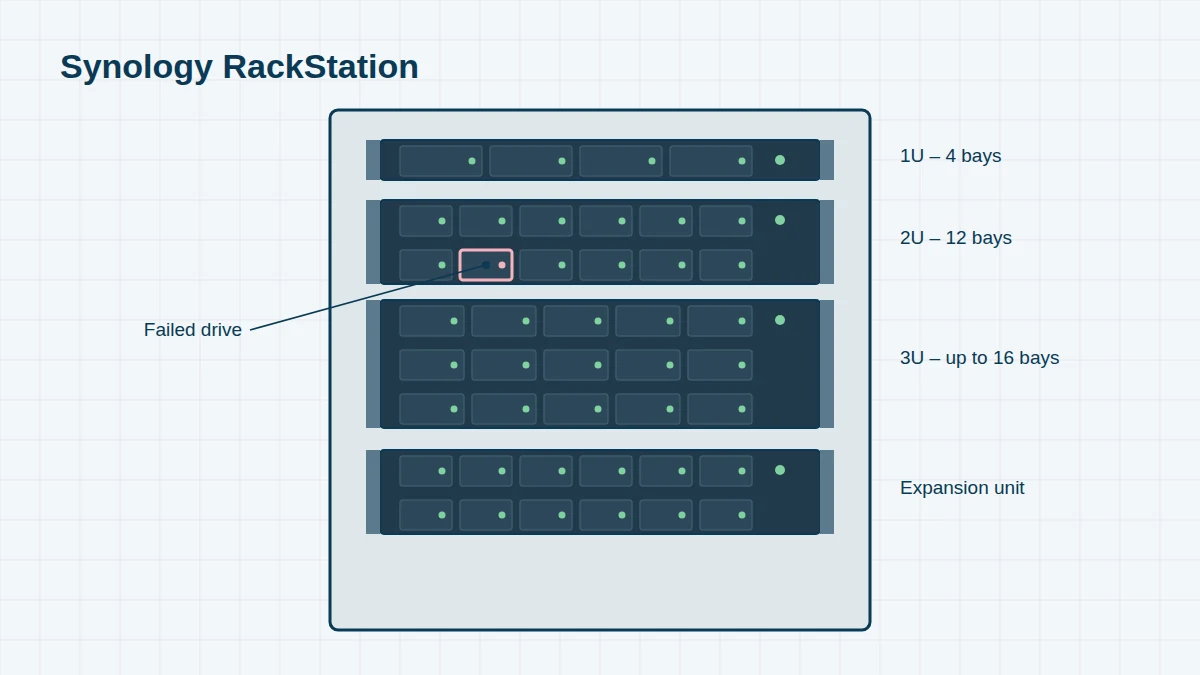
We recover data from every RackStation, from 2010’s RS810+ to current RS2825RP+ units, as well as Synology SA, FS, UC and HD systems. We work in our London lab, or on-site when your data can’t leave the building.
Synology Rackmount & Business Models, 2010 to Today
Reading a Synology model name. Take the DS1522+: DS means DiskStation (desktop); 15 is the maximum number of drives it supports including expansion units; 22 is the model year (2022); and the suffix gives the series – j entry-level, no suffix value, + Plus, xs/xs+ high-end. RS is RackStation, DX/RX are expansion units. If your model isn’t listed, send us the name from the label – we recover every Synology system.
RackStation (RS) – 1U 4-bay 11 entries
Compact rackmount units for small server rooms. RP models have redundant power supplies.
| Model year | Model | Drive bays | Notes |
|---|---|---|---|
| 2010 | RS810+ / RS810RP+ | 4 | |
| 2011 | RS411 | 4 | |
| 2012 | RS812 / RS812+ / RS812RP+ | 4 | |
| 2014 | RS814 / RS814+ / RS814RP+ | 4 | |
| 2015 | RS815 / RS815+ / RS815RP+ | 4 | RS815+ uses an Intel Atom C2000 CPU |
| 2017 | RS217 | 2 | 1U 2-bay |
| 2018 | RS818+ / RS818RP+ | 4 | |
| 2019 | RS819 | 4 | |
| 2019 | RS1619xs+ | 4 | |
| 2020 | RS820+ / RS820RP+ | 4 | |
| 2022 | RS422+ / RS822+ / RS822RP+ | 4 |
RackStation – 2U and 3U 23 entries
Larger rackmount units for business file serving, virtualisation and backup.
| Model year | Model | Drive bays | Notes |
|---|---|---|---|
| 2011 | RS2211+ / RS2211RP+ | 10 | |
| 2011 | RS3411xs / RS3411RPxs | 10 | |
| 2012 | RS2212+ / RS2212RP+ | 10 | |
| 2012 | RS3412xs / RS3412RPxs | 10 | |
| 2013 | RS10613xs+ | 10 | Scales to 106 drives |
| 2014 | RS2414+ / RS2414RP+ | 12 | |
| 2014 | RS3614xs / RS3614xs+ / RS3614RPxs | 12 | |
| 2016 | RS2416+ / RS2416RP+ | 12 | |
| 2016 | RS18016xs+ | 12 | Scales to 180 drives |
| 2017 | RS3617xs / RS3617xs+ / RS3617RPxs | 12 | |
| 2017 | RS4017xs+ | 16 | |
| 2018 | RS2418+ / RS2418RP+ | 12 | |
| 2018 | RS2818RP+ | 16 | |
| 2018 | RS3618xs | 12 | |
| 2019 | RS1219+ | 8 | |
| 2021 | RS1221+ / RS1221RP+ | 8 | |
| 2021 | RS2421+ / RS2421RP+ | 12 | |
| 2021 | RS2821RP+ | 16 | |
| 2021 | RS3621xs+ / RS3621RPxs | 12 | |
| 2021 | RS4021xs+ | 16 | |
| 2023 | RS2423+ / RS2423RP+ | 12 | |
| 2025 | RS2825RP+ | 16 | 2025 generation |
| 2026 | RS1226+ | 8 |
Enterprise, flash and high-availability systems 13 entries
Synology’s business storage runs DSM or DSM Enterprise and is often used for virtualisation, databases and large-scale backup.
| Model year | Model | Drive bays | Notes |
|---|---|---|---|
| 2019–20 | SA3400 / SA3600 | 12 | SAS storage |
| 2020 | SA3200D | 12 | Dual-controller SAS storage |
| 2023 | SA3400D | 12 | Dual-controller SAS storage |
| 2022 | SA3410 / SA3610 | 12 | |
| 2022 | SA6400 | 12 | |
| 2020 | UC3200 | 12 | Unified controller, dual-controller SAN |
| 2022–23 | UC3400 | 12 | Dual-controller SAN |
| 2018 | FS1018 | 12 | All-flash (SSD) |
| 2017 | FS2017 / FS3017 | 24 | All-flash |
| 2019–22 | FS3400 / FS3410 / FS3600 / FS6400 | 24 | All-flash |
| 2021 | FS2500 | 12 | All-flash, 1U |
| 2022 | HD6500 | 60 | High-density 4U |
| 2026 | PAS7700 | 48 NVMe | Active-active all-flash |
Business-Specific Recovery
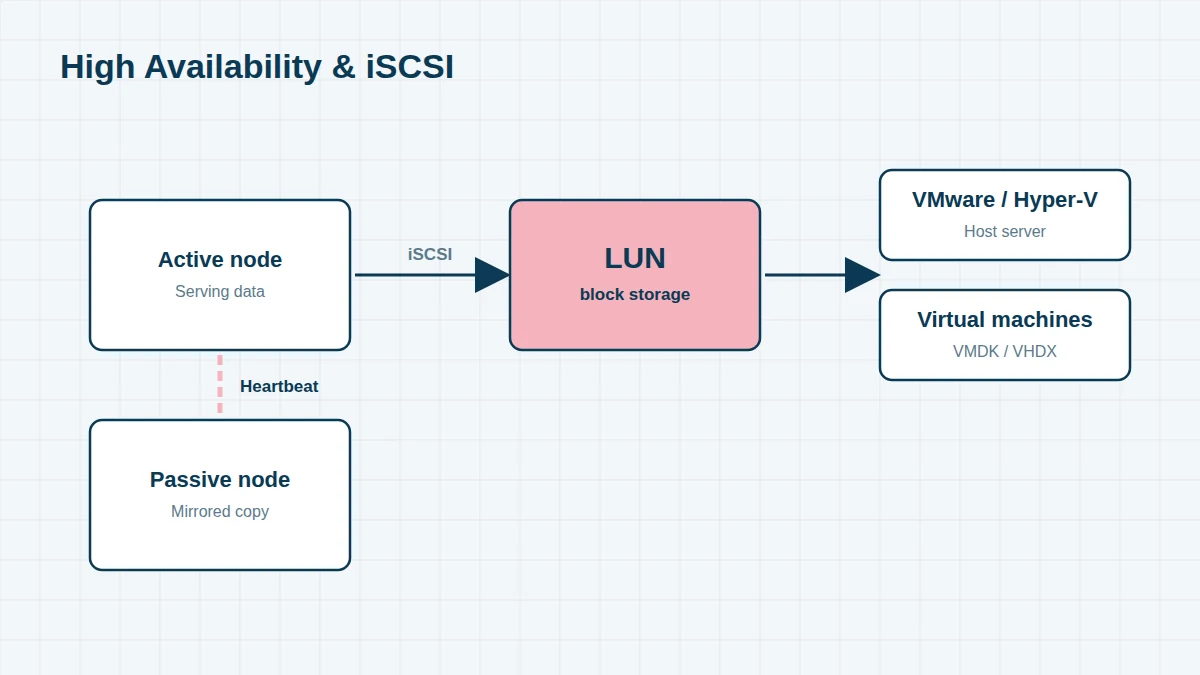
- iSCSI LUNs – many Synology systems present storage to VMware ESXi or Hyper-V as iSCSI LUNs. We recover the LUN from the Synology volume, then the VMFS datastore or VHDX files inside it. See VMware recovery.
- Synology High Availability – two RackStations mirrored as an active–passive pair. If both nodes’ copies are affected, or a failover goes wrong, we work out which node holds the most recent data before recovering it.
- Dual-controller systems (SA3200D, SA3400D, UC3200, UC3400) – both controllers share the same SAS drives. A controller fault rarely damages data, but a misconfigured recovery can.
- Expansion units – RackStations often have one or more RX expansion units, and volumes can span both. We need every drive from every unit.
- Active Backup for Business and Hyper Backup repositories stored on the NAS can be recovered and restored, even when the NAS that created them is gone.
Before You Do Anything
Don’t remove drives from a running RackStation, don’t re-create storage pools, and don’t break a High Availability pair. Shut down cleanly if you can, label every drive with its unit and bay number, and call us on 020 7064 4996. We offer an emergency service for business-critical systems.
Frequently asked questions
Can you recover a VMware datastore stored on a Synology LUN?
Yes. We rebuild the Synology storage pool, extract the LUN, then recover the VMFS datastore and the individual virtual machine disks inside it.
Our RS815+ won’t boot. Do you need the unit?
No. The RS815+ uses the Intel Atom C2000 processor, which is known to fail. The drives normally hold all your data, and we recover it directly from them.
Can you work on-site?
Yes. For organisations that can’t release their drives, we can image the disks at your premises. See on-site RAID recovery.
Free assessment, no obligation. Call 020 7064 4996 or use the form on this page – an engineer will tell you what can be recovered and what it will cost. Book online · Pricing · Locations