
WD SSD Data Recovery – WD_BLACK, WD Blue, WD Green & WD Red Since 2010
WD SSDs range from budget WD Green SATA drives to the PCIe Gen5 WD_BLACK SN8100. Since February 2025 these drives have been made by SanDisk, which separated from Western Digital, but they are still sold under the WD_BLACK, WD Blue and WD Red names – and millions of older WD SSDs remain in use.
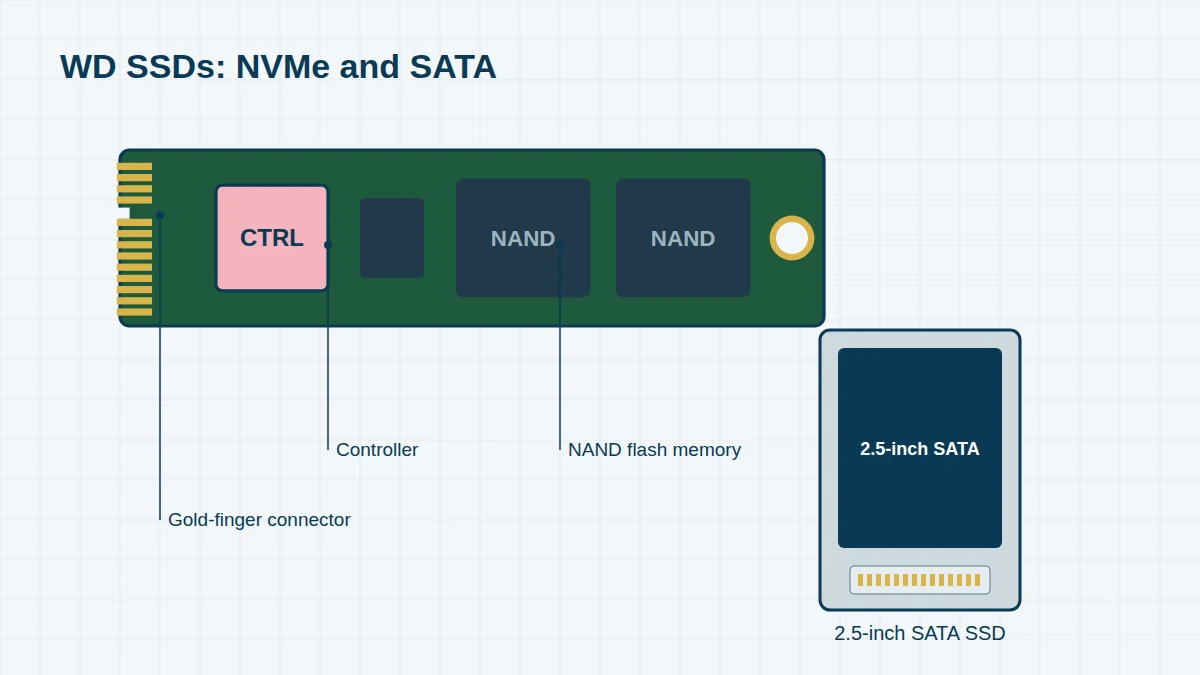
SSDs fail very differently from hard drives. There are no heads or motors; instead, the controller chip manages and encrypts everything stored in the flash memory. When the controller or its firmware fails, the drive typically disappears completely. Recovery means working with that controller, using specialist loaders, rather than removing chips.
WD SSD Models, 2010 to Today
Can’t see your model? We recover every WD drive, including OEM and white-label models. Send us a photo of the label – regional suffixes such as -00 or -WESN don’t matter.
Select a range to see its models. Launch years are approximate – many models stayed on sale for several years.
Early WD SSDs (2010–2017) 7 entries
WD’s first consumer SSDs, followed by the WD Blue, Green and Black ranges built after WD acquired SanDisk in 2016.
| Launched | Part number | Capacity | Notes |
|---|---|---|---|
| 2010 | SSC-D0064SC / SSC-D0128SC / SSC-D0256SC | 64GB–256GB | WD SiliconEdge Blue, 2.5-inch SATA |
| 2016 | WDS250G1B0A / WDS500G1B0A / WDS100T1B0A | 250GB–1TB | WD Blue SSD, 2.5-inch SATA (M.2 SATA: …1B0B) |
| 2016 | WDS120G1G0A / WDS240G1G0A | 120GB / 240GB | WD Green SSD, SATA |
| 2016 | WDS256G1X0C / WDS512G1X0C | 256GB / 512GB | WD Black PCIe (first WD NVMe) |
| 2017 | WDS250G2B0A / WDS500G2B0A / WDS100T2B0A | 250GB–1TB | WD Blue 3D NAND SATA (M.2 SATA: …2B0B) |
| 2017–18 | WDS200T2B0A / WDS400T2B0A | 2TB / 4TB | WD Blue 3D NAND SATA |
| 2017–18 | WDS120G2G0A / WDS240G2G0A / WDS480G2G0A | 120GB–480GB | WD Green SATA |
WD_BLACK NVMe (2018 onwards) 9 entries
High-performance PCIe drives for gaming PCs, workstations and the PlayStation 5.
| Launched | Part number | Capacity | Notes |
|---|---|---|---|
| 2018 | WDS250G2X0C / WDS500G2X0C / WDS100T2X0C | 250GB–1TB | WD Black NVMe (SN700 generation) |
| 2019 | WDS250G3X0C / WDS500G3X0C / WDS100T3X0C | 250GB–1TB | SN750 |
| 2019–20 | WDS200T3X0C / WDS400T3X0C | 2TB / 4TB | SN750 |
| 2020 | WDS500G1X0E / WDS100T1X0E / WDS200T1X0E | 500GB–2TB | SN850, PCIe Gen4 (heatsink: WDS100T1XHE) |
| 2022 | WDS250G3X0E / WDS500G3X0E / WDS100T3X0E / WDS200T3X0E | 250GB–2TB | SN770, DRAM-less |
| 2022 | WDS100T2X0E / WDS200T2X0E / WDS400T2X0E | 1TB–4TB | SN850X (heatsink: …2XHE) |
| 2024 | WDS800T2X0E | 8TB | SN850X |
| 2024 | WDS500G4X0E / WDS100T4X0E / WDS200T4X0E / WDS400T4X0E | 500GB–4TB | SN7100, DRAM-less Gen4 |
| 2025 | WDS100T1X0M / WDS200T1X0M | 1TB / 2TB | SN8100, PCIe Gen5 (also 4TB and 8TB) |
WD Blue & WD Green NVMe (2019 onwards) 7 entries
Mainstream NVMe drives for desktop upgrades and laptops.
| Launched | Part number | Capacity | Notes |
|---|---|---|---|
| 2019 | WDS250G1B0C / WDS500G1B0C | 250GB / 500GB | WD Blue SN500 |
| 2020 | WDS250G2B0C / WDS500G2B0C / WDS100T2B0C / WDS200T2B0C | 250GB–2TB | WD Blue SN550 |
| 2021 | WDS240G2G0C / WDS480G2G0C | 240GB / 480GB | WD Green SN350 |
| 2022 | WDS250G3B0C / WDS500G3B0C / WDS100T3B0C / WDS200T3B0C | 250GB–2TB | WD Blue SN570 |
| 2022 | WDS250G3B0A / WDS500G3B0A / WDS100T3B0A / WDS200T3B0A | 250GB–2TB | WD Blue SA510, SATA |
| 2023 | WDS250G3B0E / WDS500G3B0E / WDS100T3B0E / WDS200T3B0E | 250GB–2TB | WD Blue SN580, Gen4 |
| 2024 | WDS500G4B0E / WDS100T4B0E / WDS200T4B0E / WDS400T4B0E | 500GB–4TB | WD Blue SN5000 |
WD Red NAS SSDs 2 entries
SSDs for NAS caching and all-flash NAS arrays – see also our WD NAS page.
| Launched | Part number | Capacity | Notes |
|---|---|---|---|
| 2019 | WDS500G1R0A / WDS100T1R0A / WDS200T1R0A / WDS400T1R0A | 500GB–4TB | WD Red SA500, SATA |
| 2021 | WDS250G1R0C / WDS500G1R0C / WDS100T1R0C / WDS200T1R0C / WDS400T1R0C | 250GB–4TB | WD Red SN700, NVMe |
OEM WD SSDs (inside laptops & pre-built PCs) 5 entries
Fitted by Dell, HP, Lenovo, Microsoft and others. Not sold at retail, but among the SSDs we see most often.
| Launched | Part number | Capacity | Notes |
|---|---|---|---|
| 2018 | SDBPNPZ (PC SN520) | 128GB–512GB | NVMe, 2230/2242/2280 |
| 2019 | SDAPNUW (PC SN530) | 256GB–1TB | NVMe Gen3 |
| 2019 | SDBQNTY (PC SN730) | 256GB–1TB | NVMe Gen3 |
| 2020–21 | SDCPNRY (PC SN810) | 256GB–2TB | NVMe Gen4 |
| 2021 | SDDPNQD (PC SN740) | 256GB–2TB | NVMe Gen4, often 2230 in Surface and Steam Deck |
Portable SSDs 4 entries
External SSDs sold under the WD brand.
| Launched | Part number | Capacity | Notes |
|---|---|---|---|
| 2016 | WDBKVX | 256GB–1TB | My Passport SSD (first generation) |
| 2019 | WDBAYN | 480GB–2TB | WD Elements SE SSD |
| 2020 | WDBAGF | 500GB–4TB | My Passport SSD (hardware encrypted) |
| 2021 | WDBAWY | 1TB–2TB | WD_BLACK P40 Game Drive SSD |
Common WD SSD Failures
- SSD missing from BIOS/UEFI, or shown with a tiny capacity or wrong name
- Blue screens with some DRAM-less WD NVMe drives (such as the SN770 and SN580) on certain Windows 11 builds – a firmware update fixes this on healthy drives, but some affected systems lost access to data
- Drive switched itself into read-only mode after its flash wore out
- Controller failure after a power cut, faulty PSU or laptop charger
- Physical damage – cracked M.2 board, burnt power components, liquid damage
- PS5 expansion SSD no longer recognised (console encryption means we can only recover to the same console)
- Deleted files or formatted drive – often unrecoverable once TRIM has run
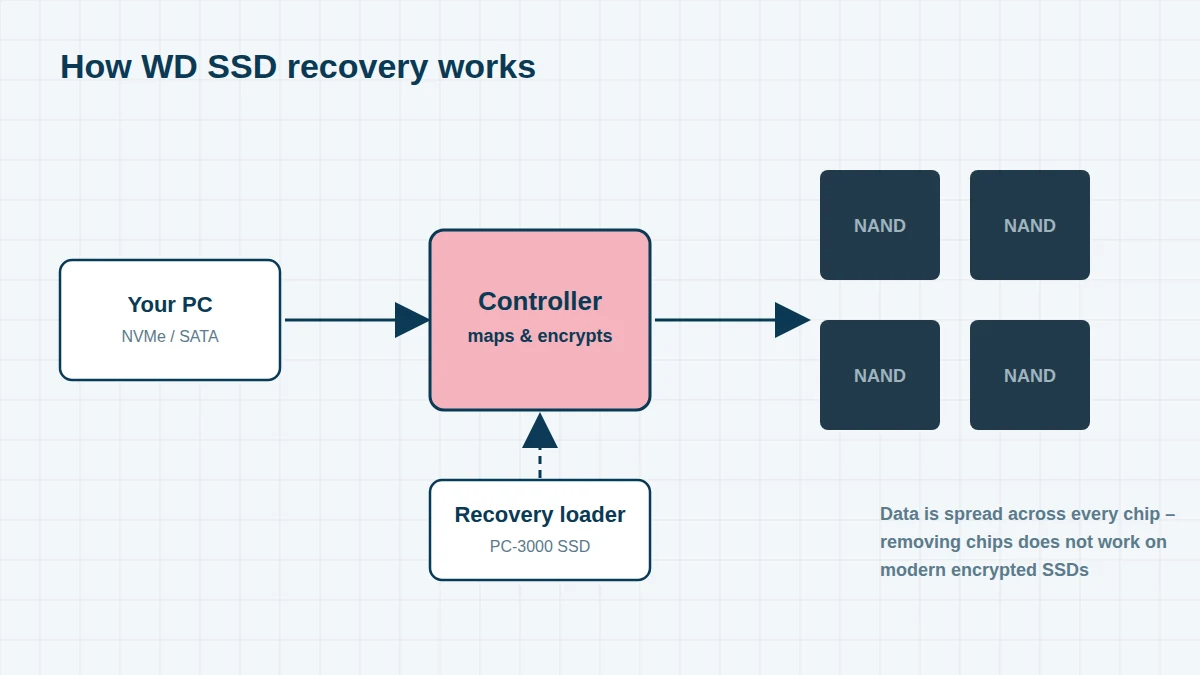
How We Recover WD SSDs
We start by checking the power circuit and replacing any damaged components. For controller and firmware failures, we identify the exact controller in your drive – WD designs its own controllers for most WD_BLACK and WD Blue NVMe models – and use a matching loader to put the drive into a safe technological mode where the flash can be read. We then create a full image and extract your files from that copy.
Encrypted laptops: many laptops with an OEM WD SSD have BitLocker or Windows device encryption switched on automatically. Please find your recovery key at account.microsoft.com/devices/recoverykey before sending the drive.
Frequently asked questions
My WD_BLACK SN850X disappeared from the BIOS. Can the data be recovered?
In many cases, yes. A drive that has vanished completely usually has a controller or firmware fault rather than damaged flash. We assess it free of charge and tell you what is possible.
Can you recover a WD SSD from a Microsoft Surface or Steam Deck?
Yes. These use 2230-size WD SSDs such as the PC SN740. For Surface devices, you will also need the BitLocker recovery key from your Microsoft account.
Free assessment, no obligation. Call 020 7064 4996 or use the form on this page – an engineer will tell you what can be recovered and what it will cost. Book online · Pricing · Locations