
WD External Hard Drive Data Recovery – My Passport, Elements & My Book Since 2010
WD external drives are the most common devices brought into our lab. They are carried in bags, knocked off desks and unplugged mid-copy, and they are often the only place a family’s photos or a small business’s backups are kept. The good news is that most failed WD external drives can be recovered – provided nobody has opened the case or swapped the circuit board first.
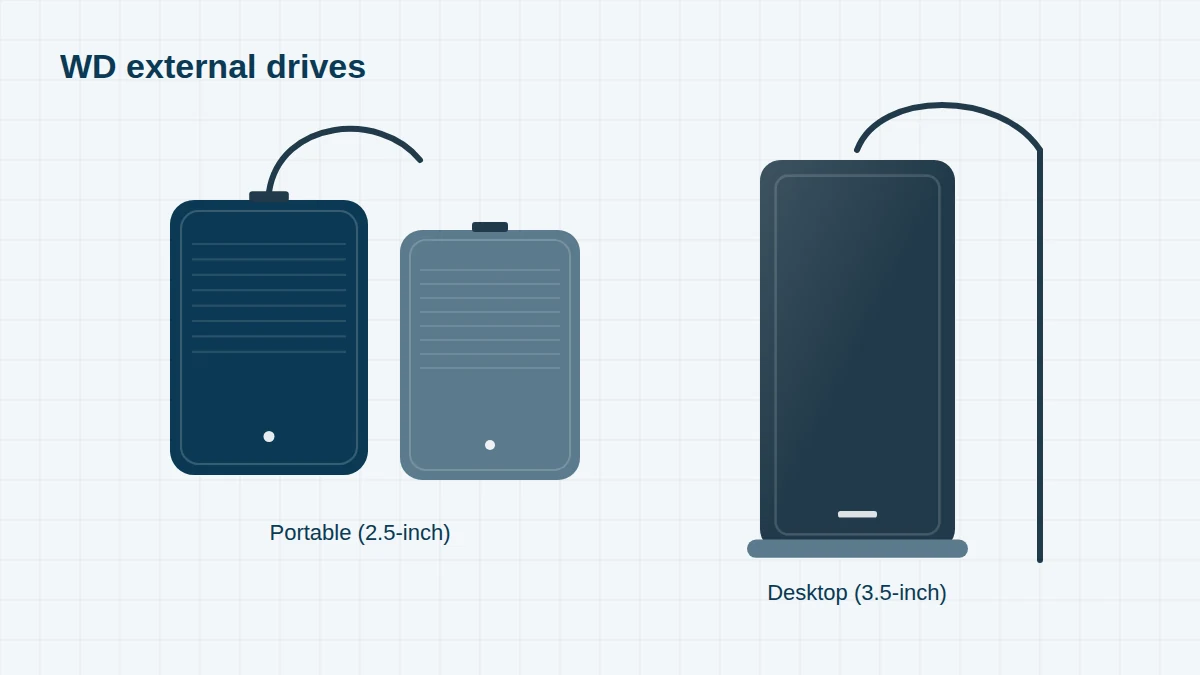
The part number is printed on a label on the underside of the drive and on the box. It starts with WDB; the four digits after the next four letters give the capacity (for example 0020 = 2TB, 0050 = 5TB) and the final letters give the colour (BBK black, BBL blue, BSL silver, BWT white).
WD External Drive Models, 2010 to Today
Can’t see your model? We recover every WD drive, including OEM and white-label models. Send us a photo of the label – regional suffixes such as -00 or -WESN don’t matter.
Select a range to see its models. Launch years are approximate – many models stayed on sale for several years.
My Passport (portable) – every generation since 2010 12 entries
In most My Passport models since about 2012, the USB connector is built directly onto the drive’s own circuit board, and data is hardware-encrypted by that board.
| Launched | Part number | Capacity | Notes |
|---|---|---|---|
| 2009–10 | WDBAAA | 250GB–1TB | My Passport Essential, USB 2.0 |
| 2010 | WDBABM | 500GB–1TB | My Passport Essential SE, USB 2.0 |
| 2010 | WDBACY | 500GB–1TB | My Passport Essential, USB 3.0 |
| 2010–11 | WDBACX | 750GB–1TB | My Passport Essential SE, USB 3.0 |
| 2012 | WDBBEP / WDBKXH | 500GB–1TB | My Passport USB 3.0 redesign |
| 2012 | WDBY8L0020BBK | 2TB | First 2TB My Passport |
| 2015 | WDBYNN | 1TB–3TB | Slim redesign |
| 2016 | WDBYFT0010BBK / WDBYFT0020BBK | 1TB / 2TB | |
| 2016 | WDBYFT0030BBK / WDBYFT0040BBK | 3TB / 4TB | |
| 2019 | WDBYVG0010BBK / WDBYVG0020BBK | 1TB / 2TB | Current design |
| 2019 | WDBPKJ0040BBK / WDBPKJ0050BBK | 4TB / 5TB | Current design |
| 2024 | WDBR9S0060BBK | 6TB | Largest My Passport |
My Passport Ultra & My Passport for Mac 7 entries
Premium versions of My Passport with the same on-board encryption.
| Launched | Part number | Capacity | Notes |
|---|---|---|---|
| 2010 | WDBAAB / WDBABW | 320GB–1TB | My Passport for Mac / Essential SE for Mac |
| 2012 | WDBLUZ | 500GB–2TB | My Passport for Mac, USB 3.0 |
| 2013 | WDBBKD0020BBK / WDBMWV / WDBZFP | 500GB–3TB | First My Passport Ultra |
| 2014 | WDBGPU0010BBK | 1TB | My Passport Ultra |
| 2019 | WDBC3C0010BSL / WDBC3C0020BSL / WDBC3C0020BBL | 1TB / 2TB | My Passport Ultra, USB-C |
| 2019 | WDBFTM0040BBL / WDBFTM0050BBL | 4TB / 5TB | My Passport Ultra, USB-C |
| 2019+ | WDBA2D / WDBA2F0040BBL / WDBA2F0050BBL | 1TB–5TB | My Passport for Mac |
WD Elements Portable & Easystore 6 entries
WD’s no-frills range. Elements drives are not hardware-encrypted, which often makes recovery quicker. Easystore is the equivalent range sold in the USA.
| Launched | Part number | Capacity | Notes |
|---|---|---|---|
| 2010 | WDBAAR | 500GB–1TB | Elements Portable, USB 2.0 |
| 2014 | WDBUZG0010BBK | 1TB | Elements Portable, USB 3.0 |
| 2016 | WDBU6Y0020BBK / WDBU6Y0030BBK | 2TB / 3TB | |
| 2016 | WDBU6Y0040BBK / WDBU6Y0050BBK | 4TB / 5TB | |
| 2024 | Elements Portable 6TB | 6TB | Current largest capacity |
| 2016+ | Easystore portable | 1TB–5TB | US-market equivalent |
WD Elements Desktop 9 entries
3.5-inch desktop drives with a mains adapter. They contain a standard SATA drive behind a USB bridge board.
| Launched | Part number | Capacity | Notes |
|---|---|---|---|
| 2010–13 | WDBAAU | 1TB–3TB | Elements Desktop, USB 2.0 / 3.0 |
| 2014 | WDBWLG0020HBK / WDBWLG0030HBK | 2TB / 3TB | |
| 2014–16 | WDBWLG0040HBK / WDBWLG0050HBK | 4TB / 5TB | |
| 2017 | WDBWLG0060HBK / WDBWLG0080HBK | 6TB / 8TB | |
| 2018 | WDBWLG0100HBK | 10TB | |
| 2019 | WDBWLG0120HBK / WDBWLG0140HBK | 12TB / 14TB | |
| 2020 | WDBWLG0160HBK / WDBWLG0180HBK | 16TB / 18TB | |
| 2021–22 | WDBWLG0200HBK / WDBWLG0220HBK | 20TB / 22TB | |
| 2024+ | WDBWLG series | 24TB+ | Latest capacities |
My Book (desktop) & My Book Duo 8 entries
My Book drives are hardware-encrypted by their USB bridge board. The My Book Duo holds two drives, usually set up as RAID 0 out of the box.
| Launched | Part number | Capacity | Notes |
|---|---|---|---|
| 2010 | WDBACW | 1TB–4TB | My Book Essential, USB 2.0 / 3.0 |
| 2013 | WDBFJK0030HBK / WDBFJK0040HBK | 3TB / 4TB | My Book (2013 design) |
| 2016 | WDBBGB0040HBK / WDBBGB0060HBK / WDBBGB0080HBK | 4TB–8TB | Current design |
| 2018–19 | WDBBGB0120HBK / WDBBGB0140HBK | 12TB / 14TB | |
| 2020–21 | WDBBGB0160HBK / WDBBGB0180HBK | 16TB / 18TB | |
| 2022 | WDBBGB0220HBK | 22TB | |
| 2025 | WDBBGB0260HBK | 26TB | Largest My Book |
| 2017+ | WDBFBE series | 8TB and above | My Book Duo (two drives, RAID 0 by default) |
WD_BLACK gaming drives 3 entries
Game drives for PlayStation, Xbox and PC game libraries.
| Launched | Part number | Capacity | Notes |
|---|---|---|---|
| 2019 | WDBA2W0020BBK | 2TB | WD_BLACK P10 |
| 2019 | WDBA3A0040BBK / WDBA3A0050BBK | 4TB / 5TB | WD_BLACK P10 |
| 2019 | WDBA3P0080HBK | 8TB | WD_BLACK D10 desktop |
Drives found inside WD external enclosures 4 entries
When we open a WD external drive we often find one of these internal drives. Knowing which one is inside helps us source compatible parts.
| Launched | Part number | Capacity | Notes |
|---|---|---|---|
| 2012–16 | WD10JMVW / WD20NMVW | 1TB / 2TB | Native-USB portable drive (My Passport, Elements) |
| 2016+ | WD40NMZW / WD50NDZW | 4TB / 5TB | Native-USB 15mm portable drive |
| 2017–19 | WD80EMAZ / WD80EDAZ / WD100EMAZ | 8TB / 10TB | White-label drives in Elements and My Book |
| 2019–22 | WD120EMFZ / WD140EDGZ / WD180EDGZ / WD200EDGZ | 12–20TB | White-label helium drives in Elements and My Book |
Why WD External Drives Need Specialist Recovery
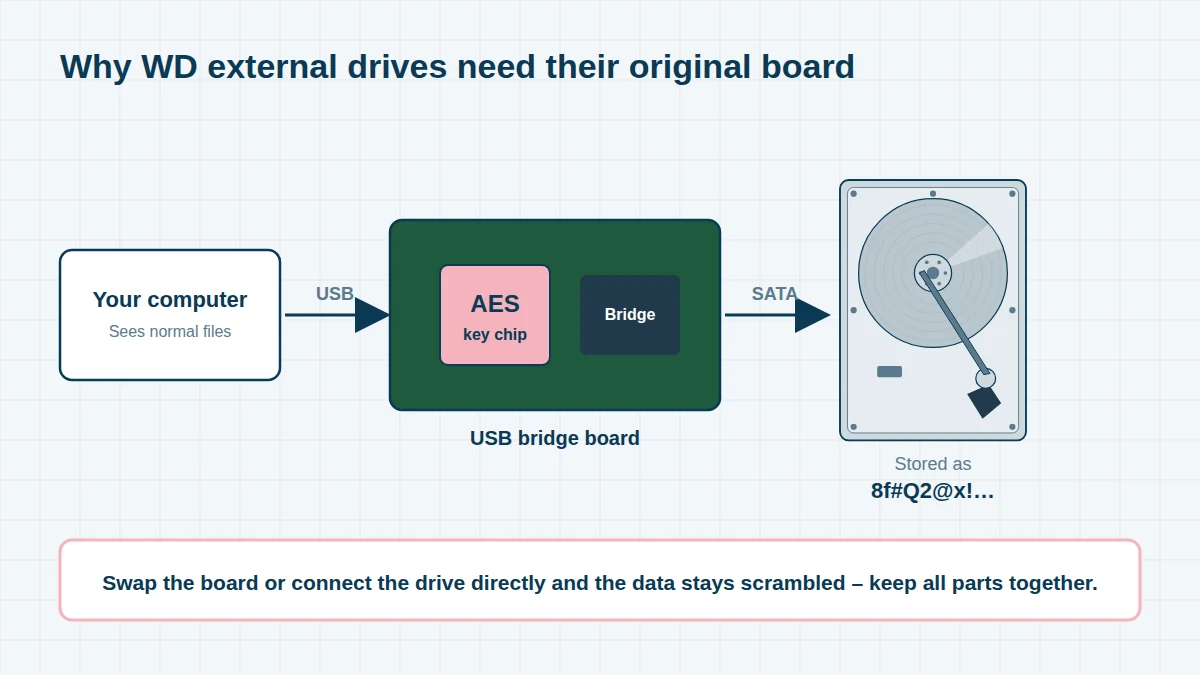
Hardware encryption. My Passport, My Passport Ultra and My Book drives encrypt everything written to them using a chip on the USB circuit board – even if you never set a password. If that board is damaged, fitting a new one or connecting the drive directly to a computer produces unreadable data. We repair the original board, or extract its encryption key, so the data can be decrypted. Please keep all parts together and don’t try a board swap.
Native-USB drives. In most My Passport and Elements Portable models, the USB socket is soldered to the drive’s own board. A broken USB port is therefore a repair to the drive itself, not the enclosure.
Common WD External Drive Problems
- Dropped My Passport now clicking, beeping or not detected
- USB micro-B socket broken or loose – drive only works at certain angles
- Drive detected but asks to be formatted, or shows as RAW
- “WD Unlocker” / “WD SES Device” appears but the drive won’t unlock
- Forgotten WD Security password (we need the password – encryption cannot be bypassed)
- My Book or Elements Desktop not powering on after using the wrong power adapter
- My Book Duo showing only one drive, or its RAID 0 volume missing
- Very slow copying followed by the drive disappearing – usually failing heads
Before you send your device – five things to avoid
- Switch the device off and leave it off – every power cycle can make physical damage worse
- Do not run CHKDSK, Disk First Aid, fsck or recovery software on a drive that clicks, beeps or is slow
- Do not open the drive or swap the circuit board – modern boards hold drive-specific adaptive data
- Do not reinstall the operating system or initialise the disk when prompted
- Keep liquid-damaged devices unpowered and bring them in as quickly as possible
Frequently asked questions
Can I take the drive out of my My Book and plug it into my PC?
You can physically, but on a My Book the data is encrypted by the USB board, so the bare drive will appear empty or unformatted. Don’t initialise it if Windows asks. Bring the drive and its enclosure to us together.
My My Passport’s USB port has snapped off. Is the data lost?
No. We repair the connector on the drive’s circuit board, or read the drive through its internal pads, then decrypt the data. This is one of our most common repairs.
I forgot my WD Security password. Can you unlock it?
Unfortunately not. WD’s hardware encryption is designed so the data cannot be read without the password. If you think you may remember it, we can help with physical faults so you can try again.
Free assessment, no obligation. Call 020 7064 4996 or use the form on this page – an engineer will tell you what can be recovered and what it will cost. Book online · Pricing · Locations