
QNAP QTS, QuTS hero & Ransomware Data Recovery
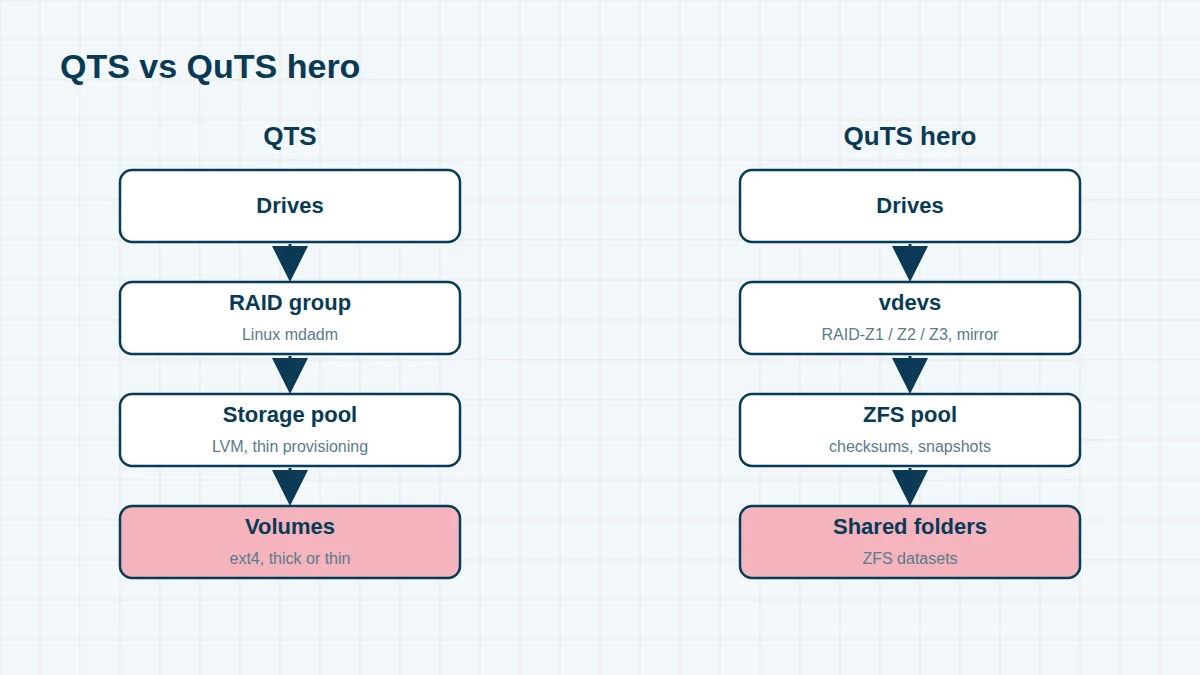
QNAP NAS devices run one of two operating systems, and they store data in completely different ways. QTS uses Linux software RAID, LVM thin provisioning and ext4. QuTS hero, launched in 2020, uses ZFS with checksums, compression, deduplication and immutable snapshots. Knowing which one your NAS uses decides how we rebuild it.
QNAP devices have also been hit by some of the most widespread NAS ransomware campaigns. This page explains what can – and can’t – be recovered after an attack.
How QTS Stores Data
- RAID groups – Linux mdadm arrays (RAID 0, 1, 5, 6, 10, 50, 60) across the drives
- Storage pools – one or more RAID groups joined with LVM, with optional SSD cache and Qtier auto-tiering
- Thick, thin and static volumes – thin volumes share pool space and are allocated on demand, so metadata damage can hide whole volumes
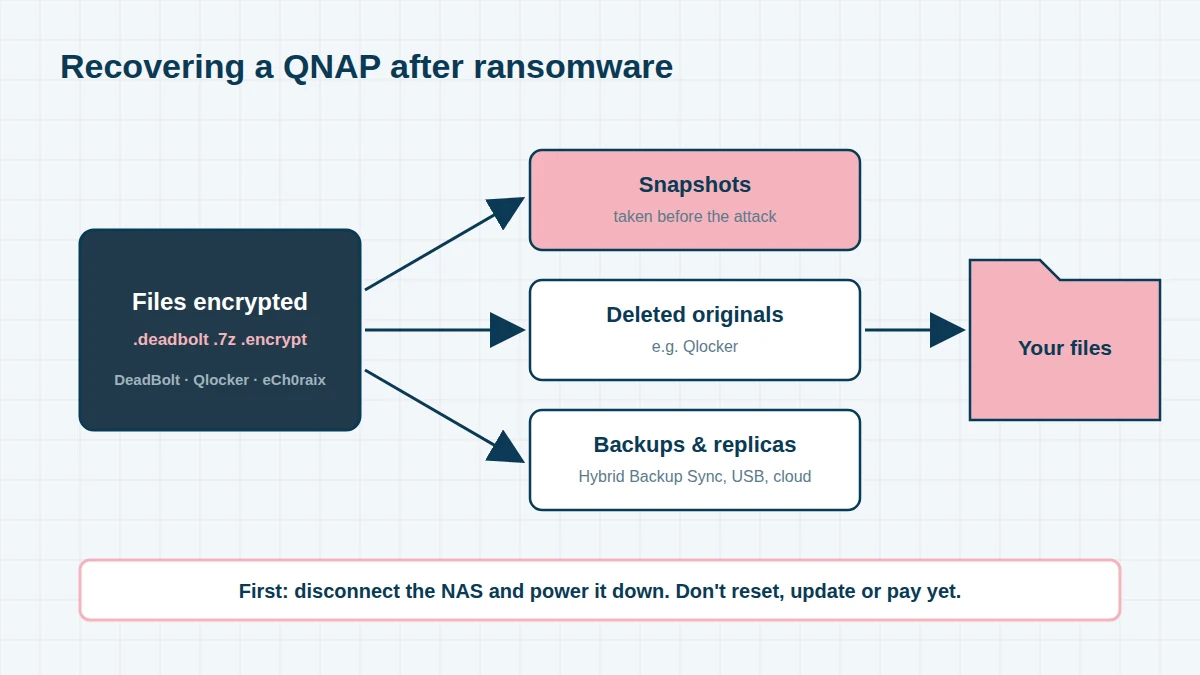
- Snapshots – point-in-time copies held inside the pool, often the key to recovering after ransomware
How QuTS hero Stores Data
- ZFS pools built from RAID-Z1, RAID-Z2, RAID-Z3 or mirrored vdevs
- Shared folders as ZFS datasets, with inline compression and optional deduplication
- Copy-on-write and checksums – ZFS keeps older versions of its metadata, which we use to roll back to a consistent state
- WORM and immutable snapshots – designed to survive ransomware if they were enabled before the attack
QTS & QuTS hero Versions
| Year | Version | Change that matters for recovery |
|---|---|---|
| 2013 | QTS 4.0 | Redesigned interface; the name QTS introduced |
| 2015 | QTS 4.2 | Virtualisation Station and Container Station expand |
| 2016 | QTS 4.3 | Storage pools with thin provisioning and snapshots become standard |
| 2020 | QTS 4.5 / QuTS hero h4.5 | QuTS hero (ZFS) launched |
| 2021 | QTS 5.0 / QuTS hero h5.0 | New Linux kernel; WireGuard VPN |
| 2023 | QTS 5.1 / QuTS hero h5.1 | |
| 2024 | QTS 5.2 / QuTS hero h5.2 | Security Center ransomware detection |
QNAP Ransomware – What Can Be Recovered
| Ransomware | What we can do |
|---|---|
| eCh0raix / QNAPCrypt (2019 onwards) | Files encrypted in place. Recovery depends on snapshots, backups, or unencrypted remnants; we check all three. |
| Qlocker (April 2021) | Files moved into password-protected 7-Zip archives and the originals deleted. Because the originals were deleted rather than overwritten, many can be recovered from the drives – especially if the NAS was switched off quickly. |
| DeadBolt (2022 onwards) | Files encrypted with a .deadbolt extension and a ransom page replacing the login screen. Snapshots taken before the attack are the best route; otherwise we look for recoverable earlier copies. |
| Checkmate and others (2023 onwards) | Targeted exposed SMB shares. Recovery follows the same approach: snapshots, deleted originals and backups. |
If Your QNAP Has Been Attacked
Disconnect the NAS from the network and shut it down – but don’t reset it, update the firmware or delete anything. Don’t pay until you’ve spoken to us: in many Qlocker and snapshot cases, data can be recovered without paying. Keep the ransom note, which identifies the strain.
Frequently asked questions
Can you decrypt DeadBolt files?
Not without the key – modern ransomware encryption can’t be broken. But we can often recover the data another way: from snapshots, from deleted original files, or from earlier copies on the drives.
My QTS thin volume disappeared when the pool filled up. Is it lost?
Usually not. When a thin pool runs out of space, volumes can be taken offline to protect them. We rebuild the pool’s LVM metadata from the drive images and recover the volume.
Is QuTS hero harder to recover than QTS?
It’s different rather than harder. ZFS keeps several generations of its metadata, which often lets us roll back to the last consistent state of the pool.
Free assessment, no obligation. Call 020 7064 4996 or use the form on this page – an engineer will tell you what can be recovered and what it will cost. Book online · Pricing · Locations