
G-DRIVE Data Recovery – Every Model Since 2010
G-DRIVE is G-Technology’s single-drive range: 3.5-inch desktop drives for studio backup and archive, and 2.5-inch mobile drives that travel with photographers and camera crews. Over the years they have used FireWire, USB, eSATA, Thunderbolt and USB-C – and many older units are still storing work that was never copied anywhere else.
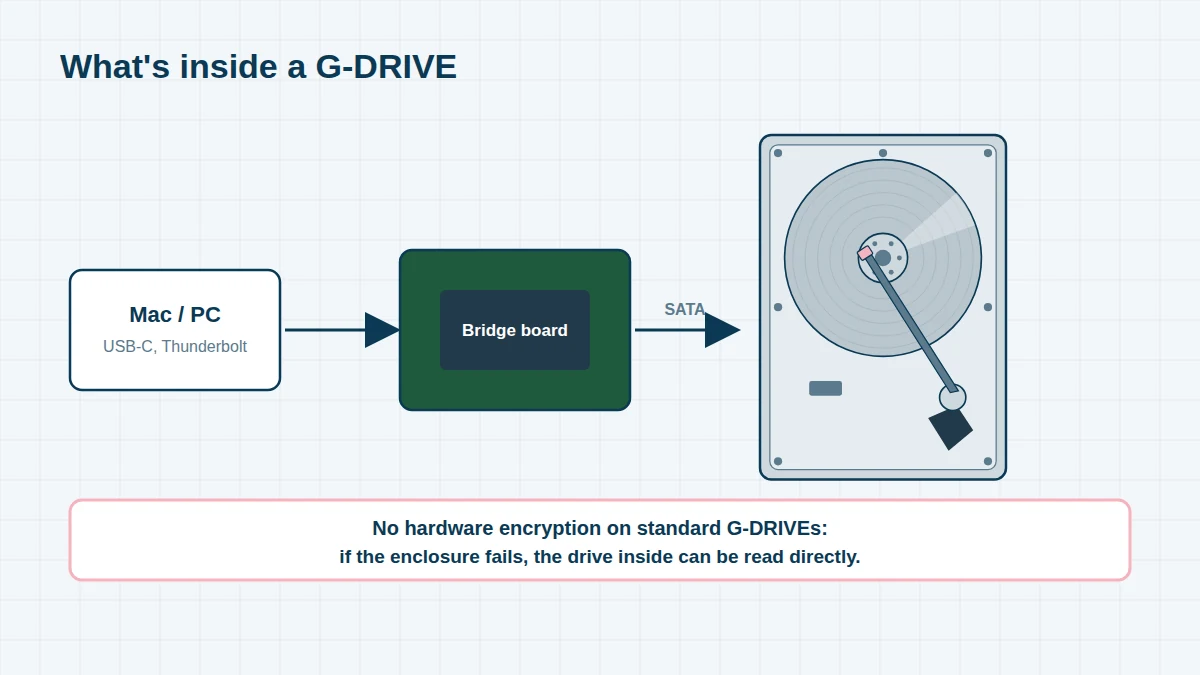
Inside almost every G-DRIVE is a Hitachi, HGST or WD drive – enterprise-class Ultrastar drives in recent desktop models. We recover these drives in our cleanroom when they fail mechanically, and we read them directly when the enclosure has failed.
G-DRIVE Models, 2010 to Today
Finding your part number. G-Technology products made before 2022 have part numbers beginning 0G (for example 0G10275-1). SanDisk Professional products begin SDP: SDPH for hard drives, SDPS for SSDs and SDPM for PRO-BLADE modules, followed by the capacity (for example SDPH81G-005T is a 5TB drive). The label is on the underside or back of the enclosure. We recover every model, listed here or not.
G-Technology G-DRIVE hard drives (2010 – 2021) 12 entries
Silver aluminium enclosures with Hitachi, HGST or WD Ultrastar drives inside.
| Era | Model | Drive | Notes |
|---|---|---|---|
| 2010–12 | G-DRIVE (FireWire 800 / USB 2.0 / eSATA) | 3.5-inch | Desktop |
| 2010–12 | G-DRIVE mobile (FireWire / USB) | 2.5-inch | Portable |
| 2010–11 | G-DRIVE Q / G-DRIVE mini | 3.5-inch / 2.5-inch | Multi-interface |
| 2012–13 | G-DRIVE slim / G-DRIVE mobile USB 3.0 | 2.5-inch | Slim portable |
| 2012–14 | G-DRIVE with Thunderbolt / G-DRIVE mobile Thunderbolt | 3.5 / 2.5-inch | First Thunderbolt models |
| 2014–15 | G-DRIVE ev / G-DRIVE ev ATC | 2.5-inch | ev Series modules; ATC has a rugged, floating case |
| 2016 | G-DRIVE ev RaW | 2.5-inch | Rugged bumper, ev Series |
| 2016–17 | G-DRIVE USB-C / G-DRIVE mobile USB-C | 3.5 / 2.5-inch | |
| 2016–18 | G-DRIVE with Thunderbolt 3 / G-DRIVE mobile Pro | 3.5-inch / 2.5-inch | Thunderbolt 3 |
| 2017–18 | G-DRIVE Pro with Thunderbolt 3 | 3.5-inch | |
| 2018 | G-DRIVE ArmorATD | 2.5-inch | Rugged, all-terrain |
| 2019–20 | G-DRIVE (USB-C, 0G1xxxx part numbers) | 3.5-inch, up to 14TB |
SanDisk Professional hard drives (2021 onwards) 4 entries
The SDPH part number includes the capacity – for example SDPHF1A-018T is an 18TB G-DRIVE.
| Era | Model / part number | Capacity | Notes |
|---|---|---|---|
| 2021–22 | G-DRIVE – SDPHF1A series | 4TB and up | USB-C desktop, Ultrastar inside |
| 2021–22 | G-DRIVE PRO – SDPH51J series | 4TB and up | Thunderbolt 3 desktop, Ultrastar inside |
| 2022 | G-DRIVE Project | Various | Thunderbolt 3, with a PRO-BLADE SSD Mag bay |
| 2021–22 | G-DRIVE ArmorATD – SDPH81G-001T / -002T / -004T / -005T | 1–5TB | Rugged portable, USB-C |
How G-DRIVEs Fail
- Head failure after a knock – the most common fault in mobile and ev drives; the drive clicks, beeps or isn’t detected
- Enclosure or bridge-board failure – the drive inside is healthy, but the USB or Thunderbolt board has failed
- Power supply failure on desktop G-DRIVEs, or damage from the wrong adapter
- Port damage – FireWire 800, micro-B and USB-C sockets broken by cables pulled at an angle
- Bad sectors on older Hitachi drives – slow copying, freezing Finder, and files that won’t open
- File system damage – HFS+ or APFS volumes that won’t mount after an unsafe eject or power cut
ev Series Drives
ev Series drives are 2.5-inch modules that slot into a G-DOCK ev, G-SPEED Shuttle XL or ev Series reader. Because they are moved between devices constantly, they are especially prone to connector and head damage. We recover ev, ev ATC, ev RaW and ev SSD modules, with or without the dock.
Before you send your device – five things to avoid
- Switch the device off and leave it off – every power cycle can make physical damage worse
- Do not run CHKDSK, Disk First Aid, fsck or recovery software on a drive that clicks, beeps or is slow
- Do not open the drive or swap the circuit board – modern boards hold drive-specific adaptive data
- Do not reinstall the operating system or initialise the disk when prompted
- Keep liquid-damaged devices unpowered and bring them in as quickly as possible
Frequently asked questions
My G-DRIVE makes a clicking noise. Can the data be recovered?
Very often, yes. Clicking usually means the heads in the internal drive have failed. We replace them in our cleanroom with matched parts and then image the drive. Please don’t keep powering it on.
Is my G-DRIVE encrypted?
Standard G-DRIVE hard drives are not hardware-encrypted, which makes recovery simpler. ArmorLock SSDs are the exception. If you enabled FileVault or APFS encryption on the drive in macOS, we’ll need your password.
Do you recover old FireWire 800 G-DRIVEs?
Yes. We recover G-DRIVEs from every generation, including FireWire, eSATA and early Thunderbolt models, whether or not you still have a Mac that can connect to them.
Free assessment, no obligation. Call 020 7064 4996 or use the form on this page – an engineer will tell you what can be recovered and what it will cost. Book online · Pricing · Locations