
Mac RAID Data Recovery – Apple RAID, Pegasus, Xserve & Thunderbolt RAID
Mac users have relied on RAID storage for years – from the Apple Xserve RAID in early-2000s edit suites, through Promise Pegasus arrays sold alongside every Thunderbolt Mac, to macOS’s own RAID sets created in Disk Utility. When a Mac RAID fails, the volume usually vanishes from the desktop entirely, and Disk Utility can’t help.
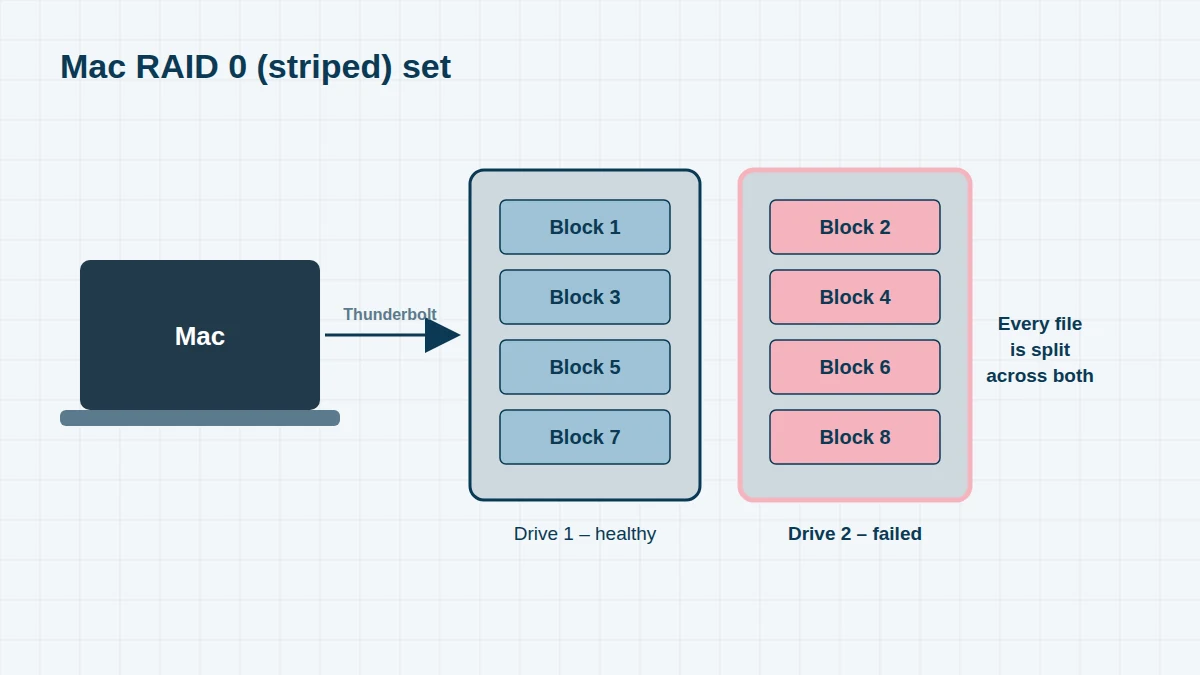
We recover Mac RAID volumes of every type, including APFS and HFS+ volumes, encrypted volumes (with your password), and Time Machine backups stored on RAID.
Mac RAID Systems We Recover
Can’t see your model? The model name is on a label on the back or underside of the unit. We recover every Mac RAID system, including models not listed here – send us a photo of the label if you’re unsure.
| Era | System | Drive bays | Notes |
|---|---|---|---|
| 2003–08 | Apple Xserve RAID | 14 | Fibre Channel; still found in older studios and archives |
| Since 2003 | macOS Disk Utility / AppleRAID sets | Any | Software RAID 0 (striped), 1 (mirrored) and concatenated |
| 2011 | Promise Pegasus R4 / R6 | 4 / 6 | First Thunderbolt RAID, sold by Apple |
| 2013 | Promise Pegasus2 R4 / R6 / R8 | 4–8 | Thunderbolt 2 |
| 2016 | Promise Pegasus3 R4 / R6 / R8 | 4–8 | Thunderbolt 3 |
| 2019 | Promise Pegasus32 R4 / R6 / R8, Pegasus R4i MPX | 4–8 | For Mac Pro 2019; R8 sold by Apple |
| 2014 onwards | OWC ThunderBay 4 / 8 with SoftRAID | 4 / 8 | Software RAID 0, 1, 4, 5, 10 |
| 2013 onwards | LaCie 2big / 5big / 6big / 12big | 2–12 | See our LaCie page |
| 2010 onwards | G-Technology / SanDisk Professional G-RAID & G-SPEED | 2–8 | See our G-RAID page |
| 2012–17 | Drobo 5D / 5D3 / Mini / 8D | 4–8 | BeyondRAID – see Drobo |
Types of Mac RAID
- macOS software RAID (AppleRAID) – created in Disk Utility or with diskutil. Striped (RAID 0) sets are common for speed; if one member fails, the whole set is lost
- Hardware RAID enclosures – Pegasus, G-RAID, LaCie and similar units, where the enclosure’s controller manages the RAID. If the controller fails, the drives use a layout only that controller understands, which we reconstruct
- SoftRAID – third-party software RAID popular with OWC ThunderBay users, with its own metadata format
- APFS on RAID – modern Macs format RAID volumes as APFS, adding containers, snapshots and optional encryption on top of the RAID
Common Mac RAID Problems
- RAID set shows as “Failed” or “Degraded” in Disk Utility, or doesn’t appear at all
- “The disk you attached was not readable by this computer” after connecting a Thunderbolt RAID
- Pegasus array showing a dead drive, or rebuilding endlessly
- RAID broken after a macOS upgrade or moving to an Apple silicon Mac
- Drives moved to a different enclosure and initialised
- Accidental deletion of the RAID set in Disk Utility
Before You Do Anything
Don’t recreate the RAID set, run First Aid repeatedly, or initialise any drive. Note which bay each drive came from, shut the enclosure down, and contact us. If the RAID holds encrypted APFS volumes, you’ll also need your password.
Frequently asked questions
I deleted my RAID set in Disk Utility by mistake. Can the data be recovered?
Usually, yes, as long as nothing new has been written to the drives. Deleting a RAID set removes its metadata, not your files. We rebuild the set from the drive images.
My Pegasus R6 has two failed drives in RAID 5. Is everything lost?
Not necessarily. We repair the failed drives, image all six, and rebuild the array – excluding any drive whose data is out of date.
Do you recover Apple Xserve RAID?
Yes. Xserve RAID units often hold archives from the 2000s that were never migrated. We recover from the drives directly, without needing a working Xserve RAID or Fibre Channel setup.
Free assessment, no obligation. Call 020 7064 4996 or use the form on this page – an engineer will tell you what can be recovered and what it will cost. Book online · Pricing · Locations