
Drobo Data Recovery – Every Model
Drobo was hugely popular with photographers, video editors and small businesses because it let you mix drives of any size and swap them without thinking about RAID. But the company behind it is gone: Drobo’s owner, StorCentric, filed for bankruptcy in June 2022, Drobo support and sales ended on 27 January 2023, and the business went into liquidation in April 2023. There are no replacement units, no firmware updates and no official support.
That matters because Drobo stores data using its own proprietary BeyondRAID system. When a Drobo fails, standard RAID tools can’t read the drives. We recover data from every Drobo model by reconstructing BeyondRAID from images of the drives – no working Drobo required.
Drobo Models
Can’t see your model? The model name is on a label on the back or underside of the unit. We recover every Drobo system, including models not listed here – send us a photo of the label if you’re unsure.
| Launched | Model | Drive bays | Notes |
|---|---|---|---|
| 2007 | Drobo (1st generation) | 4 | USB 2.0 |
| 2008 | Drobo (2nd generation) | 4 | USB 2.0 / FireWire 800 |
| 2008 | DroboPro | 8 | iSCSI / USB / FireWire |
| 2009–10 | Drobo S | 5 | eSATA / USB / FireWire; dual-disk redundancy |
| 2009–10 | DroboElite | 8 | iSCSI SAN |
| 2010 | Drobo FS | 5 | Network storage (NAS) |
| 2011 | Drobo S (Gen 2) | 5 | eSATA / USB 3.0 / FireWire |
| 2011 | Drobo B800i / B1200i | 8 / 12 | Business iSCSI SAN |
| 2011 | Drobo B800fs | 8 | Business NAS |
| 2012 | Drobo 5D | 5 | Thunderbolt / USB 3.0, mSATA SSD accelerator bay |
| 2012 | Drobo Mini | 4 (2.5-inch) | Thunderbolt / USB 3.0, mSATA bay |
| 2012 | Drobo (Gen 3) | 4 | USB 3.0 |
| 2013 | Drobo 5N | 5 | NAS, mSATA bay |
| 2016 | Drobo 5C | 5 | USB-C |
| 2016 | Drobo 5D3 | 5 | Thunderbolt 3, mSATA bay |
| 2016 | Drobo B810n / B810i | 8 | Business NAS / iSCSI |
| 2017 | Drobo 5N2 | 5 | NAS, dual Gigabit, mSATA bay |
| 2017 | Drobo 8D | 8 | Thunderbolt 3 / USB-C, SSD cache slot |
Common Drobo Failures
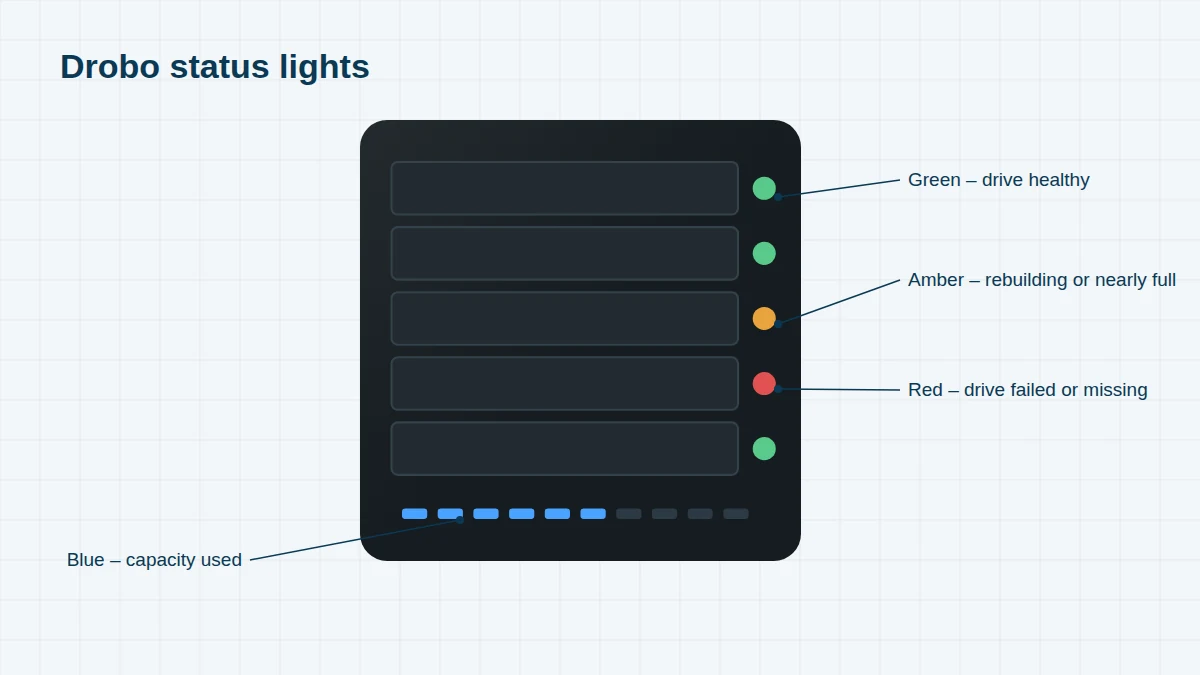
- Solid red or flashing red lights on one or more bays – a failed drive, or a drive the Drobo no longer trusts
- “Too many hard drives have been removed” or all lights flashing after a power cut
- Drobo stuck in a reboot loop, never becoming ready
- Drobo Dashboard can’t see the Drobo, or the volume doesn’t appear on the Mac or PC
- SSD accelerator failure in the 5D, 5D3, 5N, 5N2 and 8D – the Drobo may stop working even though the hard drives are fine
- Power supply or chassis failure – with no replacement units available, the drives are the only way back to your data
- macOS compatibility – Drobo warned in 2022 that macOS Ventura and later were not supported, and some direct-attached Drobos stopped mounting after upgrades
Do This Before Anything Else
Don’t move the drives to another Drobo, change their order, or add a new drive. A different Drobo may try to “fix” the disk pack and rewrite its layout. Switch the Drobo off, number each drive with its bay position (bay 1 is at the top or left), and send us every drive – plus the SSD from the accelerator bay if there is one.
Learn More
See Drobo BeyondRAID recovery to understand why Drobo recovery is different, and how we do it.
Frequently asked questions
Drobo has gone out of business. Can my data still be recovered?
Yes. We don’t need Drobo’s help or a working Drobo. We image your drives and reconstruct the BeyondRAID layout ourselves.
Should I buy a second-hand Drobo to put my drives in?
It can work if every drive is healthy, but it carries real risk: a different Drobo may start rebuilding and overwrite parts of the disk pack. If the data matters, talk to us first.
Do you need the Drobo itself?
No – just the drives, labelled by bay, and the SSD from the accelerator bay if your model has one.
Free assessment, no obligation. Call 020 7064 4996 or use the form on this page – an engineer will tell you what can be recovered and what it will cost. Book online · Pricing · Locations