
QNAP Desktop NAS Data Recovery – Every TS & TVS Model Since 2010
QNAP’s desktop NAS range – originally sold as Turbo NAS – covers everything from single-bay home units to 16-bay creative-studio towers. QNAP has released far more models than most NAS brands, often in several variants at once, so identifying exactly which unit you have is the first step in our recovery.
We recover data from every QNAP desktop NAS, whether it runs QTS (ext4 on Linux software RAID) or QuTS hero (ZFS). In most cases we only need the drives: we image each disk and rebuild the storage pool from the copies, so your original drives are never written to.
QNAP Desktop Models, 2010 to Today
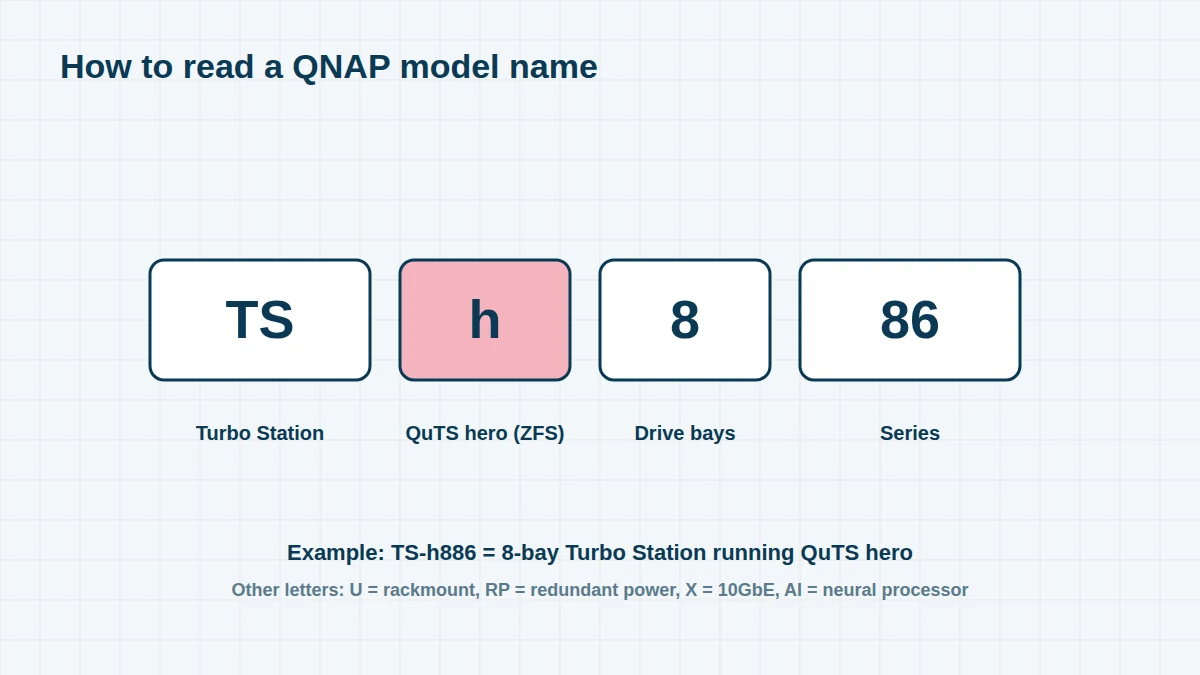
Reading a QNAP model name. In most QNAP names, the first digit after TS- or TVS- is the number of drive bays (the TS-453D has 4). An h (TS-h886, TVS-h874) means the unit runs the ZFS-based QuTS hero operating system; U means rackmount; RP means redundant power supplies; X usually means built-in 10GbE; AI marks models with a neural processing unit.
Can’t see your model? The model name is on a label on the back or underside of the unit. We recover every QNAP system, including models not listed here – send us a photo of the label if you’re unsure.
2010 – 2012 5 entries
The first Turbo NAS generations. Many are still running, often on their original drives and on firmware that no longer receives security updates.
| Era | Models | Bays | Notes |
|---|---|---|---|
| 2010–11 | TS-110 / TS-210 / TS-410 / TS-119 / TS-219P+ / TS-419P+ | 1–4 | ARM, entry-level |
| 2010–11 | TS-259 Pro+ / TS-459 Pro+ / TS-559 Pro+ / TS-659 Pro+ / TS-859 Pro+ | 2–8 | Intel Atom |
| 2011–12 | TS-112 / TS-212 / TS-412 / TS-119P II / TS-219P II / TS-419P II | 1–4 | ARM |
| 2012 | TS-269 Pro / TS-469 Pro / TS-569 Pro / TS-669 Pro / TS-869 Pro | 2–8 | Intel Atom |
| 2012 | TS-269L / TS-469L / TS-569L / TS-669L / TS-869L | 2–8 |
2013 – 2015 7 entries
The x51 and x53 families brought HDMI output and transcoding; the TVS range introduced higher-performance Intel Core models.
| Era | Models | Bays | Notes |
|---|---|---|---|
| 2013 | TS-120 / TS-220 / TS-421 / TS-420 | 1–4 | ARM |
| 2013–14 | TS-470 / TS-670 / TS-870 / TS-1270U | 4–12 | Intel |
| 2014 | TS-251 / TS-451 / TS-651 / TS-851 | 2–8 | Intel Celeron |
| 2014 | TVS-463 / TVS-663 / TVS-863 / TVS-863+ | 4–8 | AMD |
| 2014–15 | TVS-471 / TVS-671 / TVS-871 | 4–8 | Intel Core |
| 2015 | TS-251+ / TS-451+ | 2–4 | Intel Celeron J1900 |
| 2015 | TS-253 Pro / TS-453 Pro / TS-653 Pro / TS-853 Pro | 2–8 | Intel Celeron |
2016 – 2018 10 entries
| Era | Models | Bays | Notes |
|---|---|---|---|
| 2016 | TS-128 / TS-228 / TS-131P / TS-231P / TS-431P | 1–4 | ARM |
| 2016 | TS-251A / TS-451A | 2–4 | |
| 2016 | TS-253A / TS-453A / TS-653A / TS-853A | 2–8 | Intel Celeron N3150/N3160 |
| 2016–17 | TS-431X / TS-531P / TS-831X | 4–8 | 10GbE (X models) |
| 2017 | TS-253B / TS-453B / TS-653B | 2–6 | |
| 2017 | TVS-473 / TVS-673 / TVS-873 | 4–8 | AMD R-series |
| 2017 | TS-251B / TS-453Bmini | 2–4 | |
| 2017–18 | TVS-472XT / TVS-672XT / TVS-872XT | 4–8 | 10GbE, Thunderbolt 3 on some |
| 2018 | TS-128A / TS-228A / TS-328 | 1–3 | |
| 2018 | TS-1277 / TS-1677X / TVS-1282T3 | 12–16 | Ryzen / Intel desktop tower |
2019 – 2021 9 entries
| Era | Models | Bays | Notes |
|---|---|---|---|
| 2019 | TS-230 / TS-231K / TS-431K / TS-431P3 | 2–4 | ARM |
| 2019 | TS-253D / TS-453D / TS-653D | 2–6 | Intel Celeron J4125 |
| 2019 | TS-332X | 3 | 10GbE |
| 2019–20 | TS-h686 / TS-h886 | 6–8 | QuTS hero (ZFS) |
| 2020 | TS-251D / TS-451D2 | 2–4 | |
| 2020 | TVS-672X / TVS-872X | 6–8 | |
| 2020–21 | TS-473A / TS-673A / TS-873A | 4–8 | AMD Ryzen V1500B |
| 2021 | TS-h973AX | 9 | QuTS hero, 10GbE |
| 2021 | TS-133 / TS-233 | 1–2 | ARM |
2022 – 2026 10 entries
| Era | Models | Bays | Notes |
|---|---|---|---|
| 2022 | TS-264 / TS-464 / TS-664 | 2–6 | Intel Celeron N5095/N5105 |
| 2022 | TS-262 / TS-462 | 2–4 | |
| 2022 | TVS-h674 / TVS-h874 | 6–8 | QuTS hero |
| 2022 | TVS-h1288X / TVS-h1688X | 12–16 | QuTS hero |
| 2022–23 | TS-432X / TS-632X / TS-832X | 4–8 | ARM, 10GbE |
| 2023 | TS-216G / TS-416 | 2–4 | ARM |
| 2023 | TS-h1290FX | 12 | All-flash U.2 tower |
| 2024 | TS-AI642 | 6 | NPU for AI image recognition |
| 2025 | TS-h1277AFX | 12 | All-flash tower, AMD Ryzen 9000 |
| 2025 | TVS-AIh1688ATX | 12 + 4 U.2 | Intel Core Ultra, Thunderbolt 5 option |
Common QNAP Desktop Failures
- “RAID group not active”, “Storage pool error” or volume “Unmounted” after a drive failure or power cut
- NAS won’t boot – stuck with a flashing status light, beeping, or not found by Qfinder
- Intel J1900 clock failures – the TS-x51+ and TS-x53 Pro families use Intel’s Celeron J1900, which is known to develop a clock-signal fault that stops the NAS booting. The drives usually survive, and we recover them without the NAS.
- Failed firmware update leaving the NAS unbootable or the pool unmounted
- Thin volume full – when a thin-provisioned pool runs out of space, volumes can go read-only or disappear
- Ransomware – QNAP devices have been hit by eCh0raix, Qlocker and DeadBolt. See our QTS, QuTS hero & ransomware page.
Frequently asked questions
Do you need my QNAP NAS or just the drives?
Usually just the drives, labelled with their bay numbers. If the volume or shared folders were encrypted, we will also need your password or exported key.
My QNAP says the RAID group is not active. Should I click Recover?
Not if any drive has been failing or dropped out – a recovery attempt can write to the wrong disk and overwrite good data. Shut the NAS down and contact us first.
My old TS-451+ just died. Is the data gone?
Almost certainly not. The TS-451+ and similar models often fail at the motherboard, while the drives are fine. We recover the data directly from the drives.
Free assessment, no obligation. Call 020 7064 4996 or use the form on this page – an engineer will tell you what can be recovered and what it will cost. Book online · Pricing · Locations