
Synology SHR, Btrfs & DSM Data Recovery
Every Synology NAS, from a 2010 DS410 to a 2025 DS925+, stores your data in the same basic way: Linux software RAID, often wrapped in Synology Hybrid RAID (SHR), with a Btrfs or ext4 file system on top. When DSM reports that a volume has crashed, the data is usually still on the drives – what has broken is one or more of these layers.
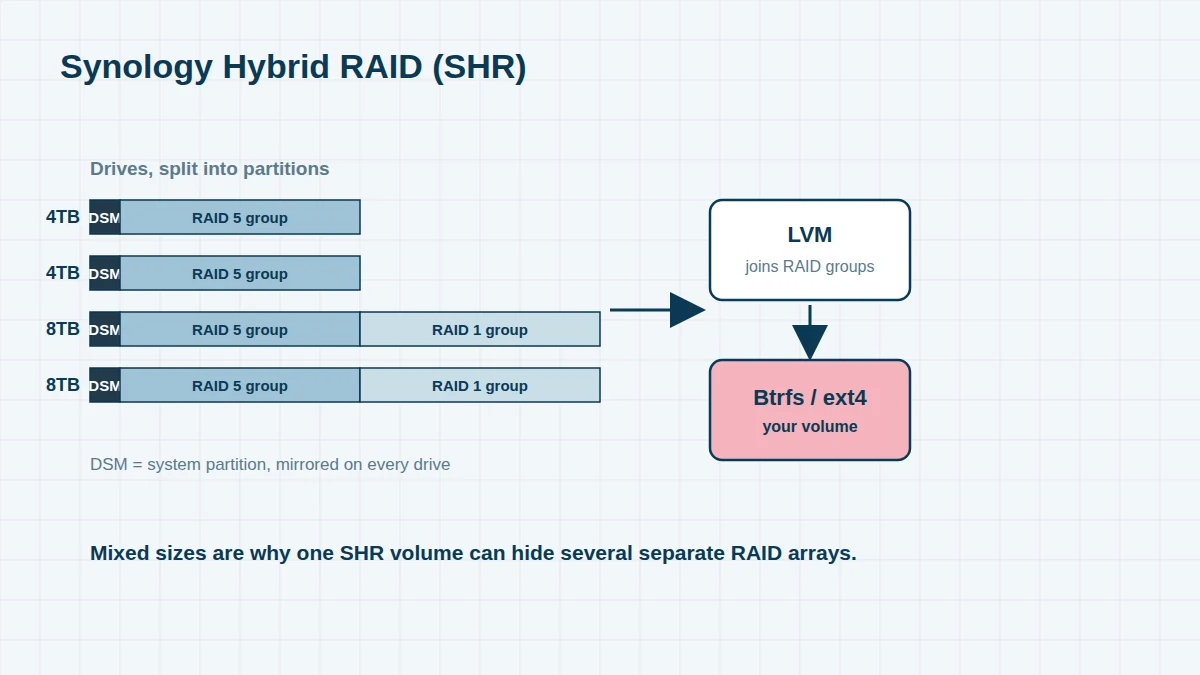
Understanding the layers is what makes Synology recovery possible. This page explains how they fit together, what goes wrong, and how we rebuild them.
How Synology Stores Your Data
- System partitions – every drive holds a small copy of DSM itself, mirrored across all disks. This is why a DiskStation can boot even when one drive fails.
- Data partitions and RAID groups – the rest of each drive is joined into Linux software RAID (mdadm) arrays: RAID 0, 1, 5, 6, 10, or SHR.
- SHR and SHR-2 – with drives of different sizes, SHR slices each drive into partitions and builds several RAID groups from them, then joins those groups together using LVM. A four-drive SHR volume with mixed sizes typically contains two or more separate RAID arrays.
- The file system – ext4 on older and entry-level models, or Btrfs (since DSM 6.0) with checksums, snapshots and compression.
- Encryption – optional encrypted shared folders (eCryptfs) or, since DSM 7.2, full-volume encryption. These need your password or key file.
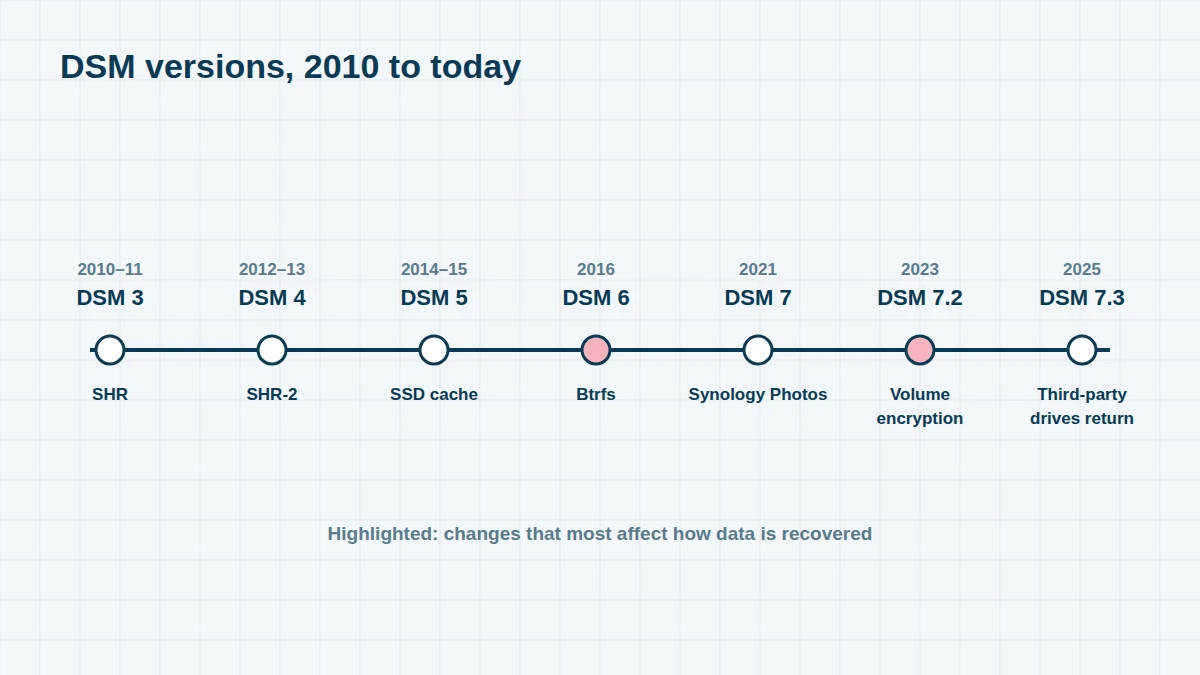
DSM Versions, 2010 to Today
| Year | DSM version | Change that matters for recovery |
|---|---|---|
| 2010–11 | DSM 3.0 – 3.2 | New web desktop; Synology Hybrid RAID (SHR) introduced, letting drives of different sizes be combined |
| 2012–13 | DSM 4.x | Cloud Station file sync; SHR-2 (two-drive redundancy) added |
| 2014 | DSM 5.0 / 5.1 | SSD caching becomes common |
| 2015 | DSM 5.2 | Last major DSM 5 release |
| 2016 | DSM 6.0 | Btrfs file system, snapshots and Hyper Backup introduced |
| 2017–18 | DSM 6.1 / 6.2 | Final version for many older models |
| 2021 | DSM 7.0 | Synology Photos replaces Photo Station and Moments; many older models not supported |
| 2022 | DSM 7.1 | |
| 2023 | DSM 7.2 | Full-volume encryption with Encryption Key Vault; immutable snapshots |
| 2025 | DSM 7.3 | Third-party drive support restored on the 2025 models; long-term support release |
What Goes Wrong
- Volume crashed – too many RAID members have failed or dropped out, or the RAID metadata is inconsistent
- Storage pool degraded, then crashed during repair – a second drive fails while DSM rebuilds
- Btrfs corruption – the volume becomes read-only or won’t mount, often after a power cut or a failing drive returns bad data
- Drives showing as “Initialized” or “Not initialized” after being moved between units
- Encrypted shared folder won’t mount, or the volume encryption key has been lost
- Deleted shared folders, snapshots or Hyper Backup versions
How We Rebuild a Synology Volume
We image every drive first, repairing any failed disks in our cleanroom. From the images, we read the RAID metadata on each partition to reconstruct every RAID group – including the multiple groups inside an SHR volume – and then rebuild the LVM layer that joins them. Finally, we repair and read the Btrfs or ext4 file system. For Btrfs, we can often recover files from earlier snapshots or tree generations, even after deletion or corruption.
Backups and Sync
We can also recover from Synology’s own backup formats: Hyper Backup repositories (.hbk folders), USB Copy, Snapshot Replication targets, and Synology Drive and Cloud Station sync folders – including restoring a Hyper Backup set without the NAS that created it.
Frequently asked questions
DSM says my volume has crashed. What should I do?
Don’t click Repair or Online Assemble, and don’t reinstall DSM. Download the logs from Storage Manager if you can, then shut the NAS down and label the drives by bay number. Every write to the drives can reduce what’s recoverable.
Is SHR harder to recover than RAID 5?
It has more layers, because SHR combines several RAID groups with LVM. We rebuild each layer from the drive images, so SHR volumes are just as recoverable as standard RAID.
Can you recover a Btrfs volume that is stuck in read-only mode?
Usually, yes. A read-only Btrfs volume often means DSM detected checksum errors. We copy the drives first, then extract the data using the file system’s own redundant metadata.
Free assessment, no obligation. Call 020 7064 4996 or use the form on this page – an engineer will tell you what can be recovered and what it will cost. Book online · Pricing · Locations